Sound familiar?
Every week, the same story
- MondayA new spelling list comes home.
- FridayThe spelling test.
- TonightSomeone has to read every word out loud. And you can’t say…
Google Translate’s speaker button helps a little. A tutor helps more, but costs money. Neither one sits down and tests your child.
How it works
A few minutes on Monday. Then your child practises on their own, all week.
-
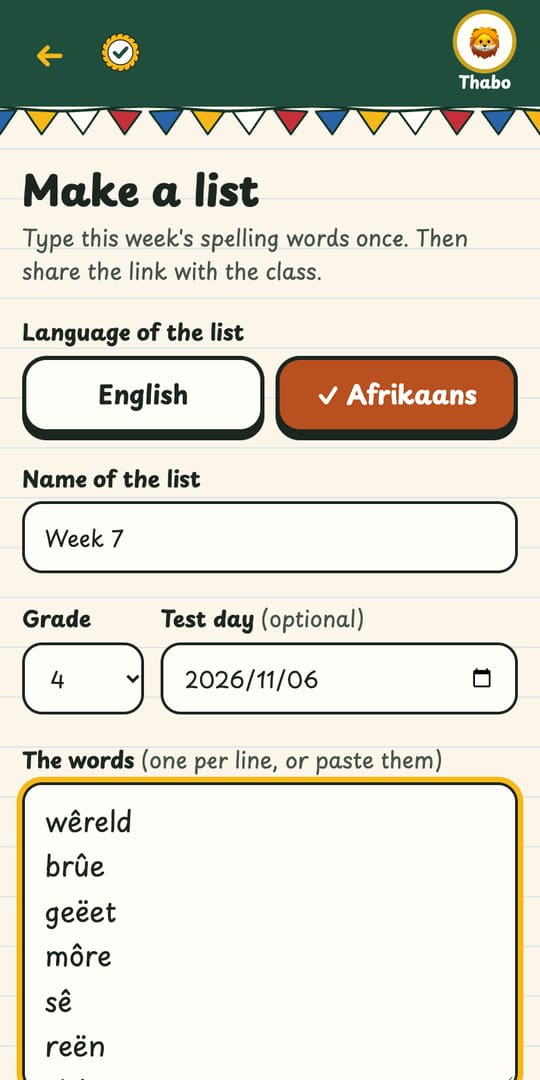
Type or paste the list once
From the homework book or the class WhatsApp. One word per line. Add the teacher’s sentence if there is one.
-
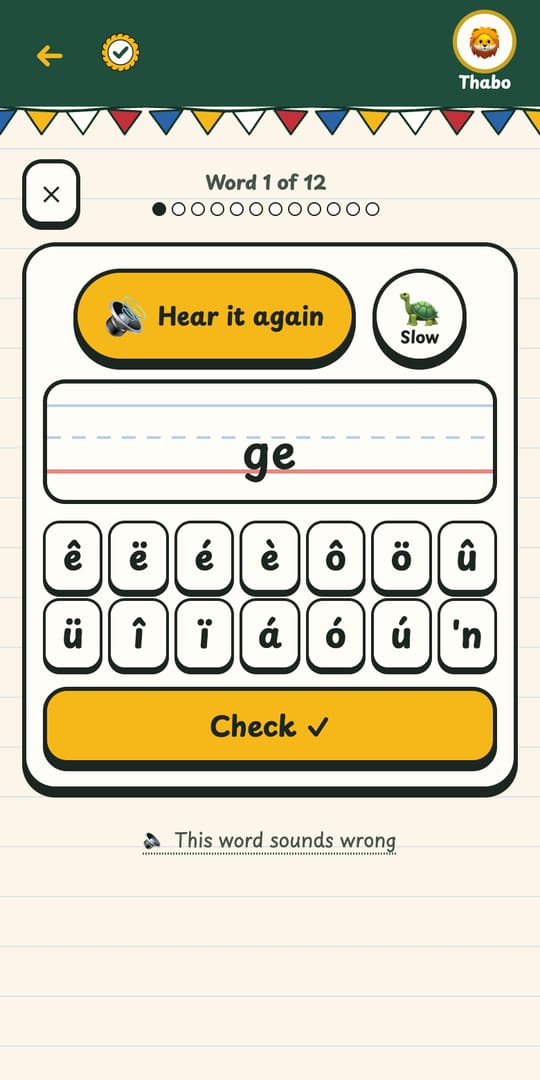
The app reads every word
Said properly, as often as your child needs. Tap 🐢 to hear it slowly. Tap ê or ë instead of hunting for it on the keyboard.
-
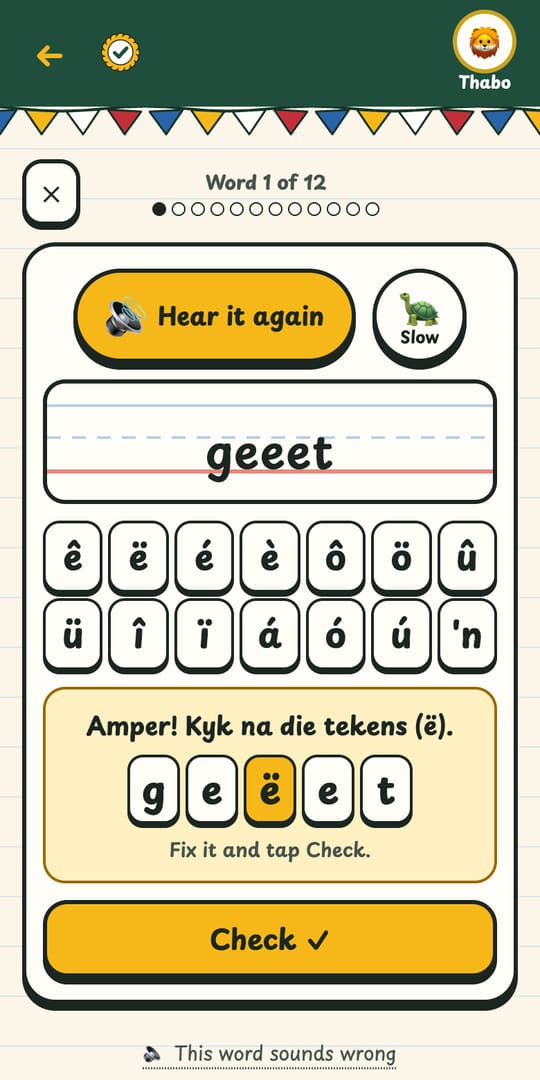
Your child types it and sees what to fix
Right, almost (a missing ë), or the letters that are wrong. Missed words come back until your child knows them all.


Why parents like it
-
Every word said properly
A real South African voice reads Afrikaans, and a clear, friendly voice reads English. No guessing.
-
Your child’s own list
Not a fixed word bank. Whatever comes home this week, from any school and any teacher.
-
The marks count, like at school
ê is not e. The app marks it the way the teacher will, and a one-tap row puts ê ë ô û right there.
-
Slow, or in a sentence
Tap 🐢 for slow. Add a sentence and it goes “word – sentence – word”, just like a real test.
-
One list for the whole class
Share it in the class WhatsApp group. Every parent practises the same list, free.
-
A profile for each child
Brothers and sisters each get their own lists and progress on one phone. Just a nickname and an emoji.
-
Works offline
Once a list has been opened, it keeps working without data. In the car, or at Gran’s.
-
Grown-ups, try to keep up!
After a round, a grown-up plays the same words, with no slow button. Can you beat your child?
For the class WhatsApp group
One parent types it. The whole class practises.
Everyone in the class gets the same list. So only one person needs to type it.
-
On Monday, one parent (or the teacher) types the list. It takes a few minutes.
-
Tap “Share on WhatsApp” and send it to the class group.
-
Every parent taps the link. The list opens, ready to practise. No typing, no sign-up, free.
Grade 4 parents
Class group
Week 7 (12 woorde)
Practise this spelling list on Spelling Champs
spellingchamps.co.za
Graad 4 spelwoorde vir Vrydag 👉 spellingchamps.co.za/l/7Hk2mQ9xPa
19:42 ✓✓

Why I made this
I’m a South African dad. My son is in Grade 4, and every week he brings home an English spelling list and an Afrikaans one, with a test on Friday.
I type the words in once. The app says each word, he types it, and it tells him if he got it right.
If you don’t speak Afrikaans, you can still help your child, because the app reads the words for you.
It’s free while we test it. If a word sounds wrong, tap “This word sounds wrong” in the app and I’ll fix it.
Questions parents ask
Short answers. No small print.
Is it free?
Yes. Spelling Champs is free while we test it. No card, no sign-up.
Do I need an account?
No. Open the app and start. Your lists and your child’s progress are kept on your phone.
Which grades is it for?
Any list your child brings home: Grade 1 to Grade 7, and up. You type the words, so it fits every school, every teacher and every week’s spelwoorde.
Does it work in Afrikaans?
Yes, that’s why we built it. A real South African voice reads the Afrikaans words, and marks like ê, ë and ô count, just like in the test. English lists work too.
What about my child’s data?
Children never need a real name: just a nickname and an emoji. Lists hold only words, and anyone with a list’s link can see those words. No ads. No tracking cookies.
Does it work offline?
Yes. Once a list has been opened with internet, it keeps working without data. Add it to your home screen and it opens like an app.
Can I share a list with the class?
Yes. After you save a list, tap “Share on WhatsApp”. Every parent with the link can practise it with their own child, free, on their own phone.
Does it work on my phone?
It works in the web browser on any Android phone, iPhone, tablet or computer. Nothing to download.
This week’s list, sorted.
Type it in tonight. Your child can practise before bed, and every night until Friday.
Launch appFree while we test · No sign-up · Works on any phone
